Tag: FOSS

  • FOSS for the third sector

    FOSS for the third sector

    Afallen Partner David Clubb was asked to give his thoughts about how Free and Open Source Software (FOSS) could help the third sector. This article was first published by Newid.

    Header photo: courtesy of Marcus Winkler.


    What is open source software?  

    Free and open source software (FOSS) is a category of software that follows the principles of freedom, specifically defined by four core freedoms:    

    • The freedom to run the program as you wish, for any purpose  
    • The freedom to study how the program works, and change it so it does your computing as you wish  
    • The freedom to redistribute copies so you can ‘help your neighbour’  
    • The freedom to distribute copies of your modified versions to others  

    While the underlying principles are crucial, what matters most to Third Sector Organisations like yours is the practical benefit: with FOSS, you’ll never face the risk of rising licence costs or surprise changes in terms. This gives you greater control and stability for your operations.  

    Adopting FOSS allows you to modify and adapt software to your needs. This is a great benefit for organisations operating in Wales as it makes it easier to translate the user interface into Welsh. Doing so is an essential consideration given our policy environment and the needs of our users.  

    Advantages and disadvantages of open source software  

    While the four freedoms inherent in FOSS ensure its cost-effectiveness and customisation potential, there are additional benefits that make it an attractive choice for Third Sector Organisations.  

     Some of these advantages include:  

    • Security: The transparent nature of FOSS code can lead to increased scrutiny, resulting in more eyes on the code to spot mistakes and enhanced security for end-users.  
    • Community engagement: FOSS projects often foster vibrant communities of users and developers who go above and beyond to support newcomers. This collaborative spirit is particularly rewarding when you’re able to pay it forward by sharing your own expertise with others.  

    Although the relatively lower levels of commercial support can mean relying on the community for help, this highlights the importance of considering the vitality and activity level of the underlying community when choosing FOSS software. Fortunately, there are straightforward ways to refine your search and ensure you select well-supported open-source solutions.  

    Finding alternatives to commercial software

    FOSS solutions can rival and sometimes surpass their commercial counterparts. However, the biggest hurdle for non-profit organisations is typically identifying suitable FOSS alternatives that match or improve upon their current commercial tools. That’s where Alternativeto.net comes in, a dedicated search platform focused on software and web services.  

    For instance, if you’re looking for an alternative to Adobe Illustrator, simply visit Alternativeto.net, enter “Adobe Illustrator” into the search bar, and explore the available options. Inkscape stands out as the clear leader among FOSS alternatives to Adobe Illustrator, boasting over 2,000 likes, as well as being software that I can personally attest to!

    Alternativeto.net’s filtering system allows you to narrow down your results by selecting only FOSS alternatives, giving you a clear indication of each software’s popularity. This can help you make an informed decision when choosing between different FOSS solutions, ensuring that you select one that is well-supported and popular among users.  

    Rather than trying to anticipate every software need of Third Sector Organisations in Wales, I highly recommend exploring Alternativeto.net and seeing if any suggestions can help you save money or improve functionality. This experimentation is an investment in education and learning, essential for growth and development. Given Wales’ productivity gap with respect to the other UK nations, adopting an exploratory approach like Alternativeto.net can serve as a catalyst for Third Sector Organisations in Wales to develop their internal capacity and expertise.  

    Self-hosting your own online services  

    So far we have only covered software that can be installed on individual machines. However, it’s equally important to consider tools that can benefit your entire organisation.

    This is where we venture into the world of ‘self-hosting’ where Third Sector Organisations might initially feel apprehensive. However, there are some brilliant tools to significantly simplify the process of hosting online services.  

    One self-hosting solution I’m particularly fond of is Pikapods. This service offers an affordable, monthly subscription model that simplifies the deployment and maintenance of various online FOSS services for your organisation. It covers applications such as helpdesk systems, discussion forums, and accounting software. I’m currently using Pikapods for web analytics, messaging services and mailing list management.  

    I’m also a big fan of Softaculous, which is often bundled with web hosting services. This tool makes it incredibly easy to install FOSS packages like WordPress websites, invoicing tools, e-commerce platforms, and internal social media networks for organisations. If you’re not already using Softaculous, I recommend asking your web provider if they offer access to this feature.

    How can FOSS revitalise old computers?  

    As they say: 

    “The most sustainable device you can own is the one you’re currently using”

    Unfortunately, many technology companies design their products with a finite lifespan in mind, discontinuing support for security updates and effectively mandating that devices be replaced rather than refurbished or repurposed.  

    Linux offers a solution to this. Linux is a FOSS operating system that powers the vast majority of global servers, including the systems on board the International Space Station where reliability is vital. It is also increasingly being seen as an effective alternative to Windows or Mac operating systems and is becoming an important gaming platform in its own right.  

    Linux might sound technical, but you don’t have to be technical to use it. In practice, Linux systems can work as well as, or better than Windows or Mac. They are very well suited to older machines that struggle with the requirements of the latest Windows operating systems.  

    For example, Linux systems:  

    • Can be comparatively lightweight in their hardware requirements, generally needing less RAM and CPU power to attain similar levels of performance  
    • Are generally more secure due to the openness of the operating system, and the relatively small number of viruses created for it 
    • Do not come bundled with lots of unnecessary or annoying additional software  

    Many organisational tasks are now carried out in the cloud via a browser. This reduces barriers for organisations considering adopting Linux as an alternative operating system for older machines. So adopting Linux is a more sustainable and secure way of reducing IT equipment costs while minimising your environmental impact by repurposing equipment you already own.  

    Ubuntu and Linux Mint are good distributions for beginners as they are user-friendly and have large communities of support. For something that resembles Windows more closely, you could try ZorinOS. Here’s a recent guide for how to install Linux on one of your organisation’s old computers.

    My top tips  

    1. Encourage your colleagues to experiment with different tools or systems in a safe environment, for example by using hosting providers that automatically backup the systems on a daily basis  
    2. Always consider a FOSS alternative when thinking about using software to solve a problem or offer a new service. Alternativeto.net is the go-to site for this research 
    3. Be prepared to seek support online if you get stuck. Many people who work on FOSS projects are happy to offer free support. 
    4. If you’ve experienced a big ‘win’ through adopting FOSS, share your experiences with other Third Sector Organisations to help generate wider benefits for Wales  
    5. Follow the Tech4Good Cymru page on LinkedIn to hear about events in the sector, and to network and learn from like-minded organisations  

    My favourite FOSS tools  

    • Linux operating systems  
    • LibreOffice for all office-related work  
    • Inkscape for graphic design  
    • The Firefox browser  
    • Open source social media platforms such as Mastodon and Pixelfed  
    • Logseq for journaling, learning, meeting planning and as a personal CRM  
    • Zulip for team messaging  
    • NextCloud as an alternative to Microsoft or Google cloud services

    Conclusion  

    FOSS offers a way for Third Sector Organisations to reduce the costs of doing business and delivering services. FOSS is inherently customisable, greatly simplifying the process of translation or providing other customisations necessary for staff or service users.  

    Whilst FOSS could bring the challenge of unfamiliarity for many users, there are thousands of active communities ready to support new participants. This provides a learning opportunity, which can help drive productivity.  

    Given the very low cost of trying FOSS in the workplace, why not give it a go; you may surprise yourself with what can be achieved using tools that welcome participation from anybody, no matter their social status, background or financial means.

  • Linux phones – Ubuntu Touch

    Linux phones – Ubuntu Touch

    A Fairphone 3 showing the homescreen and some apps on the left hand side.

    Linux phones – my experience with Ubuntu Touch

    Earlier this year (2024) I wrote an article about my belief in linux phones as a partial solution to the multiple distractions and negative influences being piped directly into childrens’ brains by their use of mobile phones, and particularly the use of social media, at a young age.

    If my own children are to use linux phones, I have to dogfood it for myself. Partly to show leadership, partly for reasons of trouble-shooting.

    For the last week or so I have been using Ubuntu Touch (by UBports) on a OnePlus Nord N10 5g, and then a Fairphone 3 (because I lost my OnePlus!) to understand whether I could use it as my daily phone, without having my GrapheneOS Android in close proximity. (Note – if you’re not yet ready to leave Android but you want to take the first step in mobile privacy, GrapheneOS is a brilliant first step if you have a Google Pixel phone).

    TLDR: I’m not yet ready to use Ubuntu Touch as my daily driver. Read on to find out why.

    A Fairphone 3 showing the homescreen and some apps on the left hand side.

    Caveats

    I have a limited amount of time to be able to properly dig into different alternatives to various apps. I have gone as far as trying flatpak versions of different software packages in order to get things to work. However it is likely that there are solutions to some (most?) of the problems I encountered. I am grateful for any suggestions for alternatives that might work!

    Why Ubuntu Touch?

    There are plenty of people who will tell you that Ubuntu Touch isn’t ‘real’ linux because it’s based on an Android ‘layer’ that enables it to use the hardware.

    That’s fine; I’m less interested in purity than usability. I love 💗💗 the work being done on PostmarketOS and other pure linux systems, and I can’t wait until they are able to work with the drivers on a wider array of phones. But until then one of my ‘show stopper’ use cases is taking photos of my family, and in that case Ubuntu Touch is probably the best choice.

    Ubuntu Touch can also run Android apps via Waydroid (this is also the case with most linux mobile systems), which helps make the transition to a linux device more manageable.

    Ubuntu Touch also tends to be available on more modern phones; if I’m going to be moving from Android, I want my phone to have realtively good specs.

    Installation

    Most linux-enabled phones are on the old side, and I want something newer both for myself and for my kids when they are old enough to need a phone of their own

    I looked at the websites to find the most ‘modern’ linux-compatible phone I could (as of June 2024) and it appeared to be the Nord 10 5g. I bought one for £120 on ebay.

    Ubuntu Touch (Ubports) was the most likely solution, even though it’s not ‘pure’ linux (it’s a modified layer sitting on top of the Android driver set). This is because the disadvantage of sticking close to the android code base (more on that later) is mitigated by the good access to the camera. And having a good quality, working camera, is an absolute show-stopper for me

    Running the UBPorts installer is generally a piece of cake, but in this instance it failed; my first attempt resulted in a soft bricked phone. I hadn’t read the instructions, which specified that it should be downgraded.

    That set me back a few months as all my computers are linux. The downgrade tool provided by OnePlus only works on Windows.

    Lucky for me I had a Fairphone 3 as backup (£60 on ebay) as I have since lost the Nord 10! But nonetheless I learned some useful lessons along the way, not least to read the documentation before trying to install.

    Installing Ubuntu Touch on the Fairphone is very straightforward. Connect the phone via USB, run the installer and you’re away. Super-simple.

    On OnePlus Nord 10, you have to downgrade the software using the MSM tool you then just connect the phone via USB and run the installer as for the Fairphone.

    Things that just worked

    Here’s a list of things that worked mostly just like you expect.

    • Camera
    • Phone calls
    • Text messages
    • Wifi and hotspot
    • Mobile internet
    • Bluetooth
    • Browser (Morph, a bit basic but fine)
    • Messaging or social media apps such as:
      • Telegram (via Teleports or Webber)
      • Element (Matrix)
      • WhatsApp Web (using a burner Android phone as the ‘host’)
      • Mastodon

    In other words, most of the basic functionality that you would expect from a simple smart device is functional.

    Things that worked via Waydroid

    Some functionality is not available natively to Ubuntu Touch and needs to be installed through Waydroid. This has a delayed startup compared with a native app; which is usually not a big problem. These apps include:

    • One of my banking apps (Nationwide) – note several other banks did not work via Waydroid
    • Privacy Friendly Sudoku (fun to challenge friends/family to the daily puzzle)

    Things that took a bit of working out

    MFA/2FA

    I struggled a bit with a suitable 2FA app. Initially I used the 2FA Manager app; however I wasn’t able to use either the camera or manual login. Happily Authenticator NG worked perfectly.

    WhatsApp

    I also wanted a work-around for WhatsApp. I refuse to install the app on any device, and anyway there’s no app for it on Linux phones. So the solution is to use a burner Android phone (use an old or super-cheap ebay one) as the main account, and then login via WhatsApp Web. The formatting via the app worked much better than the browser version in my case.

    Contacts

    I couldn’t figure out an easy way to sync my contacts with Nextcloud (I have struggled with WebDav), so I manually exported from my ‘main’ phone and imported them which worked fine.

    Things that haven’t worked out

    Sadly there are some things that either haven’t worked at all, or are only partially successful.

    GPS

    Navigation is one issue; Android phones are apparently bundled with drivers and software to make GPS connections very fast. This is not the case with Linux installations, which are slower to identify location. Whilst in principle the various mapping tools, such as Pure Maps or uNav, work perfectly, they are dependent on the GPS location in the first place.

    If you are patient this does not present a problem. If not it might be an issue. GPS fix is affected by density of nearby buildings etc, so is likely to be a bigger problem in towns and cities than the countryside.

    Banking apps

    I have a business bank account that just didn’t work; this is a problem, as the app is generally needed to confirm purchasese, payments etc. I guess this is something that could be done on the burner phone, but it is less convenient. There is likely no way around the issue as the banks have security that is tied to the Android operating system.

    Password manager

    I didn’t expect a password manager to be a problem, but I couldn’t get a work-around for Bitwarden; the web vault refused to open, and there appear to be no viable locally installed password managers.

    Podcasts

    I’m a big listener to podcasts, and there is a perfectly usable podcast player, PodPhoenix. However I like to listen at 1.6x speed, and there is no capacity to modulate the listening speed. This would mean I would have to miss out on a substantial number of podcasts.

    E-reader

    When I run out of podcasts, I like to listen to books being ‘read’ (text to speech). This is possible on GrapheneOS via Librera FD but I haven’t found anything similar yet for UT.

    Design choices

    While I’m on the subject of Ubuntu Touch, I think it’s worth mentioning that the notifications/top pull-down bar is not as intuitive or helpful as the standard Android or PostmarketOS one. Sometimes you have to search around a bit to find (for example) the wifi hotspot or torch functions. Although not a showstopper, there’s probably a reason why other systems have gone with the ‘most used’ apps in an easily reachable drag-down area.

    Other than that, the swiping system and pinning of apps works effectively.

    Conclusion

    As it stands, I am having to bring along my existing GrapheneOS device as well as the Ubuntu Touch for my daily driver, predominantly to listen to podcasts at variable speed. Also quality of life stuff like the banking apps (though less of a showstopper).

    Having two phones with me is probably the reason I lost my first Ubuntu Touch so I’m going to revert to GrapheneOS for now, and maintain a strong interest in the further development of Ubuntu Touch, PostmarketOS and other mobile linux systems.

    However, the reasons for me reverting the GrapheneOS phone are not showstoppers for my own children, and I am confident that when it’s time for me to consider what phone they should have, I will feel reasonably happy with mobile linux as an ethical and practical choice.

    Edits

    Added the lack of an E-reader that can provide TTS functionality

    One response to “Linux phones – Ubuntu Touch”

    1. […] Linux phones – Ubuntu Touch – David Clubb October 16, 2024 […]

  • Technology and Cymraeg

    Technology and Cymraeg

    Technology and Cymraeg

    In June 2024 Welsh Government launched a ‘call for information‘ on what is needed to make technology more friendly to Cymraeg.

    I produced a response to highlight the power of open source in enabling low-cost, high quality and ‘translation-friendly’ services. I post the response in full below.

    Hashtags:

    Recommendations

    • The value of Free and Open Source Software (FOSS) to health and well-being in Wales is so profound that it should be supported through a fund or equivalent of approximately 0.001% of the NHS budget
    • Public bodies in Wales should be required to use a FOSS equivalent (where one exists) of any existing proprietary social media platform, and to contribute to Welsh translations of the platforms

    Philosophy

    Technology is never agnostic. The deployment of technological tools depends strongly on the philosophy of those who created it. My response to this call for information is therefore predicated on the standpoint that open source solutions are generally preferable to commercial and proprietary alternatives. 

    Open source (also known as FOSS – Free and Open Source Software) has four freedoms:

    • Freedom 0: The freedom to run the software as you wish, for any purpose.
    • Freedom 1: The freedom to study how the software works, and change it so it does your computing as you wish
    • Freedom 2: The freedom to redistribute copies so you can help others
    • Freedom 3: The freedom to distribute copies of your modified versions to others. By doing this you can give the whole community a chance to benefit from your changes.  

    The beauty of FOSS to Wales is:

    • Using FOSS eliminates the leakage of money from Wales for licencing costs for using proprietary software
    • FOSS usually makes it very easy to translate, greatly reducing barriers to adoption for people who would like to use the Welsh language. 
    • Using FOSS can help upskill people within Wales (see freedoms 1 and 2).
    • Using and supporting FOSS directly helps achieve Wales’ future generations goal of ‘Globally Responsible’, because any improvements that are supported or produced from participants, volunteers or donors in Wales, are freely available for use or adoption by anybody globally, reducing the barriers to participation by the poorest in society (in Wales this supports the socio-economic duty)

    In the European context, Wales is a poor country within a poor unitary state, particularly if London is excluded. Issues of ownership and licensing are very important in this context. The use of proprietary software effectively means that the people of Wales are paying people elsewhere so that we can de-skill ourselves.

    In February 2022 I produced a White Paper entitled: “Why Wales should embrace free and open source software”. In it I made the case for open source against several Welsh Government objectives in the Digital Strategy for Wales. FOSS directly supports the following components:

    • Digital inclusion – creating digital public goods
    • Digital skills – widening participation in learning, and participation in communities of technology and interest
    • Digital economy – for some sectors, savings of more than 80% have been achieved through the use of FOSS

    For further details see the White Paper.

    The benefits of Cymraeg

    The use of the Welsh language produces numerous benefits for the individual, and still more for the community at large. Some of the individual benefits include:

    • Improved health outcomes
    • Improved career prospects
    • Increased performance in learning additional languages
    A mind map showing the links between the Welsh language and a range of positive well-being indicators

    Some of the benefits of using Cymraeg, all of which are evidence by peer-reviewed literature

    The health, educational and economic benefits are so profound that I believe the case should be made to divert a tiny proportion (say 0.001%) of the budget for the NHS to establish or fund an independent organisation aimed at improving understanding and adoption of FOSS in Wales.

    Cymraeg and communication technologies

    Welsh public institutions have been ‘captured’ by the early proprietary communication platforms to the extent that most use X/Twitter, LinkedIn, Instagram or other platforms without a thought as to the rationale, or the case for using alternatives that better support the Welsh language.

    The use of proprietary platforms indirectly enriches far-right voices, and certainly leads to a leakage of money and skill to (usually) America-based organisations through advertising and data harvesting.

    The proprietary platforms are not generally responsive to requests for making their interfaces multi-lingual, in direct contrast to their FOSS equivalents. 

    In order to properly implement the requirements of the Well-being of Future Generations Act, as well as the Welsh Language Act, public bodies in Wales should therefore be required to use FOSS social media platforms (where they exist) in addition to, or as a replacement for, their existing use of proprietary social media platforms. 

    This would give the opportunity for them to also contribute to the Welsh language translations of these platforms, making them more suitable for Welsh-language users.

    Other blog posts relevant to this article:

  • Reaping the open source benefit for Wales

    Reaping the open source benefit for Wales

    Digital infrastructure and services underpin much of our modern existence. In work and leisure, with family and friends, we inhabit – to ever-greater extents – a digital world. This world, much like the ‘real’ world, is characterised by huge disparities in access and opportunities.

    Many digital opportunities are jealously guarded by global corporations that create walled gardens within which we communicate, share, and create huge wealth for others.

    However, if we scratched just a tiny bit below the surface, we would see that there are myriad opportunities available to almost everyone, if we could only understand how to take advantage of them.

    In Afallen’s first White Paper, published at today’s inaugural meeting of the Senedd Cross-Party Group on Digital Rights and Democracy, we set out why Wales must take advantage, not just of the digital opportunities through adopting different technologies, but in the fundamentals that underpin the digital world.

    Free and Open Source Software (FOSS) underpins the majority of global digital infrastructure, from the WordPress platform that underpins nearly half of global websites, to Apache and Nginx servers carrying more than half of global web servers, to the mushrooming sector of the Internet of Things.

    The economic benefits are huge; a study recently commissioned by the European Commission estimated a return of €4 for every Euro invested into FOSS. That’s partly why the EU has a dedicated open source strategy, and why officials view FOSS as the future for the EU.

    However, there are a whole host of reasons for supporting FOSS, aside from the economic. These include environmental sustainability; equality of access; and better educational and career outcomes.

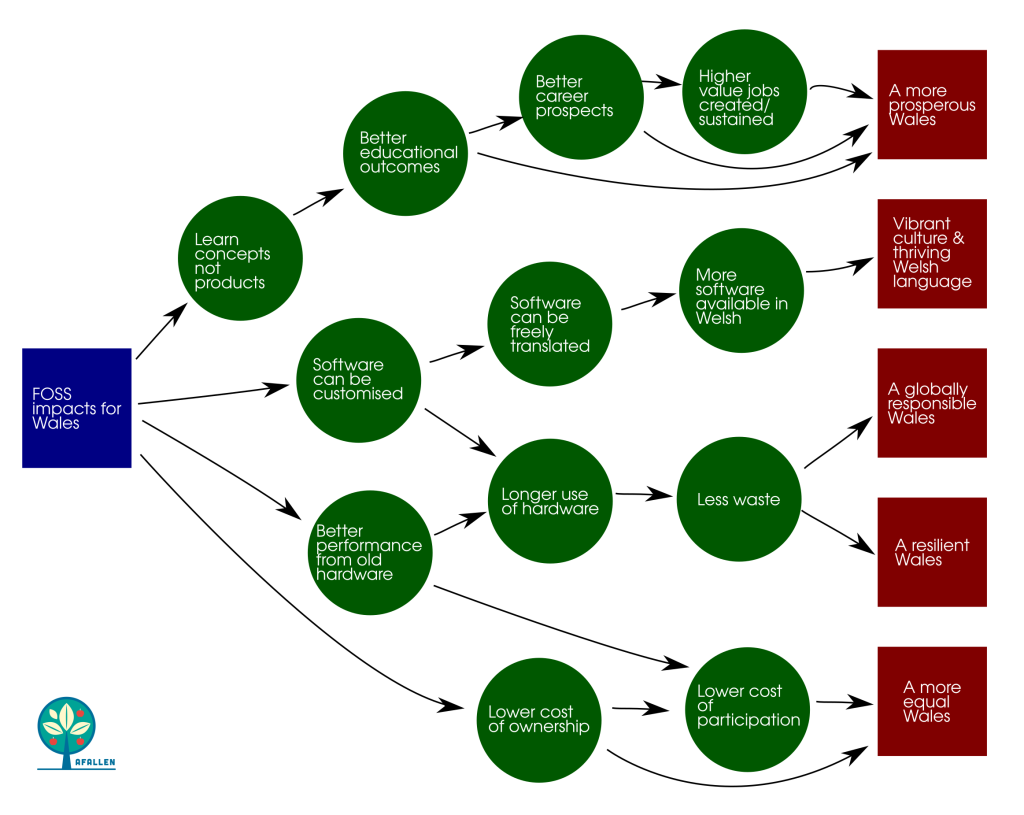
    Another reason, specific to Wales, is that FOSS is strongly aligned with the Future Generations Goals and Ways of Working. By my reckoning, a FOSS strategy would support no fewer than five of the Goals.

    Systems map showing links between open source impacts, and the Future Generations goals

    But the biggest reason for wanting to champion FOSS is in the field of education. Imagine if learners of all ages in Wales were educated not just in using digital tools; but also steeped in an understanding of the very concepts that will make up the digital tools of the future. We could create a generation of users, producers, hackers and shapers that understand the fundamentals of code, and have the curiousity and the skills necessary to engage, modify and improve on that which has gone before.

    It might seem a tall order; but remember how a Russian cyber-attack first paralysed Estonia, a country of 1.3 million people, and then propelled it to become a global centre of expertise on cyber-security.

    If Estonia can do it, our devolved education system means that we can do the same for FOSS in Wales.

    So what are the next steps for us? In the White Paper I suggest three initial approaches to help embed FOSS within the policy and education landscape in Wales.

    Firstly, our digital strategy needs to explicitly recognise the value in FOSS as a distinct component of ‘digital’ overall. The first anniversary of Wales’ digital strategy is nearly upon us; what better time to reflect on the growing body of evidence, and the policy goals of our nearest economic trading partners, than to incorporate FOSS within the main policy statement for the sector?

    Secondly the Curriculum for Wales should specify FOSS as a component within digital competency, helping pave the way for educators to introduce the concepts and practises of the sector within our learning centres.

    Finally, we must make good use of infrastructure which already exists and is helping to spread good practice in digital across the public sector. The Centre for Digital Public Services could help public sector bodies pilot, and then potentially adopt, FOSS-based ways of doing things that may help with the delivery of a whole host of public goods and services.

    Embracing FOSS will enable the citizens of Wales to not only participate in a rapidly-developing global digital economy with new skills, expertise and confidence; but also to help lift others by contributing to the sum total of human knowledge, freely gifted to all.